Private betaNow inviting testers on Android

Pull every loose end onto one thread.

Welvin gives every trip, project and idea its own private thread. Notes, photos, files, links and places, strung together and easy to find.

Secured with encryption Search every word Share in from any app
The app

Feels like texting yourself. Works like a filing cabinet.

Each thread looks like a chat, so adding things takes a second. Behind it, Welvin keeps everything sorted by topic and type.

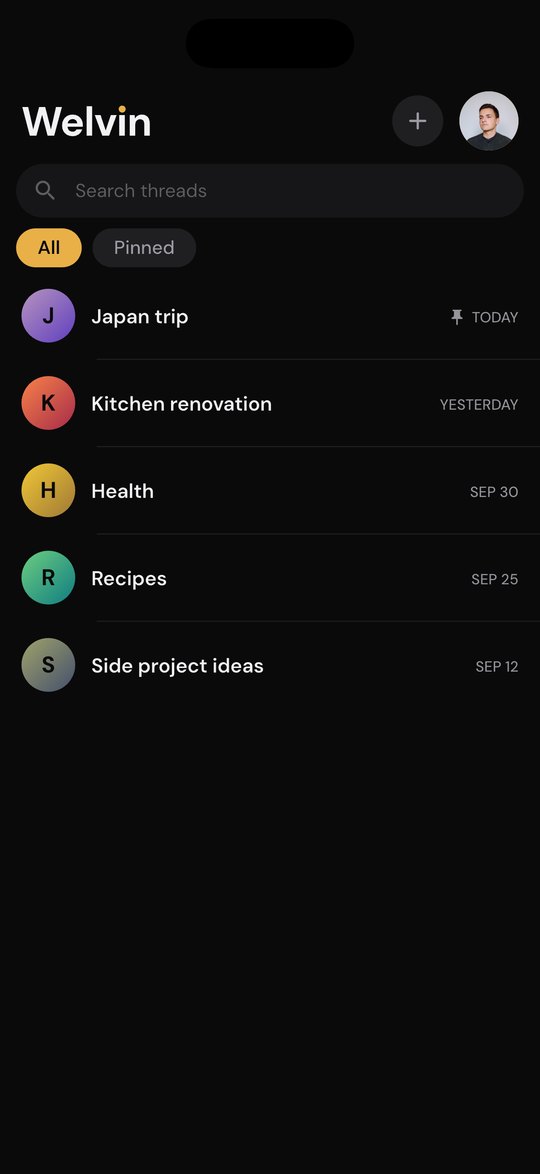
Welvin Home screen listing threads: Japan trip (pinned), Kitchen renovation, Health, Recipes and Side project ideas
The Media tab of the Japan trip thread, a grid of travel photos
Features

No more digging through five apps for one booking.

A thread for everything

Trips, projects, health, ideas. Pin the ones you open most so they stay on top.

Drop in anything

Notes, up to 30 photos at once, files up to 25 MB, links with previews, and where you are.

Sorted for you

Every thread keeps its photos, files and links in their own tabs. No folders to manage.

Find it in seconds

Search your threads from Home, and every word inside a thread, back to the first message.

Share in from any app

Tap Share in Photos, your browser or Files, pick Welvin, and choose the thread it belongs in.

Private by default

Only you can see your threads. Photos and files sit in private storage, never on a public link.

How it works

Three steps. No setup.

  1. 1

    Start a thread

    Name it after anything: a trip, your car, a recipe you're perfecting.

  2. 2

    Drop things in

    Write it like a message to yourself, or share it in from another app.

  3. 3

    Find it later

    Search it, or flip to its Media, Files and Links tabs. It's where you left it.

Coming later · Welvin AI

Soon, your threads will answer back.

We're building an assistant that knows what you've saved. Ask in plain words and get the answer, with the message it came from.

Not in the beta yet. Beta testers hear about it first.

When do we check in at the ryokan?
Welvin AI From 3pm on your first night in Kyoto. You saved the booking on 2 October. Gion stay - 3 nights
Privacy

Your threads are yours.

Welvin is a place for personal things, so it's built to keep them that way.

Only you can see them

Every thread is tied to your account. Nobody else can open it.

Encrypted

Protected on the way to our servers and while it's stored there.

No public links

Photos and files open through short-lived private links that expire.

Leave any time

Delete your account in Settings and everything goes with it.

Questions

What is Welvin?

A private app for keeping everything about one topic together. Each topic is a thread, and you add notes, photos, files, links and places to it like messages to yourself.

What can I save in a thread?

Text, up to 30 photos at a time, files up to 25 MB (PDF, Word, Excel, PowerPoint, ZIP, audio and video), links with previews, and your current location.

Who can see my threads?

Only you. Threads are private to your account.

Which phones does it work on?

Android and iPhone.

How do I join the beta?

Android: join our tester group, then install Welvin from Google Play. Both links are in Join the beta. iPhone: the TestFlight beta opens soon. Ask us to tell you when it does.

How do I delete my account?

In the app, open Settings › Account › Delete account. You can also ask us to delete it.

Be one of the first.

Try Welvin before launch. Your feedback shapes what we build next.

Android

Open now
  1. 1. Join the tester group with your Google account.Join the tester group ↗
  2. 2. Accept the invite, then install Welvin from Google Play.Install from Google Play ↗
Use the same Google account for both steps.

iPhone

Coming soon

The iPhone beta opens on TestFlight soon. Leave your email and we'll send you the link the day it's ready.

Email me when it's ready Opens your email app with the message ready to send.